
 User Management for Joomla 5 & 6
Frontend UserManager
Give your clients the ability to manage users, user groups and access levels — all from the Joomla frontend. No backend access needed. User Import & Export is included for bulk workflows and migrations.
The problem
Joomla's user management lives in the administrator backend. But giving clients backend access means exposing menus, settings and functionality they should never see. Training them to navigate the backend is a support headache.
The solution
Frontend UserManager moves user, group and access level management to the frontend — with a clean, simple interface that your clients can use without any training. You stay in control of what they can see and do.
What you can do
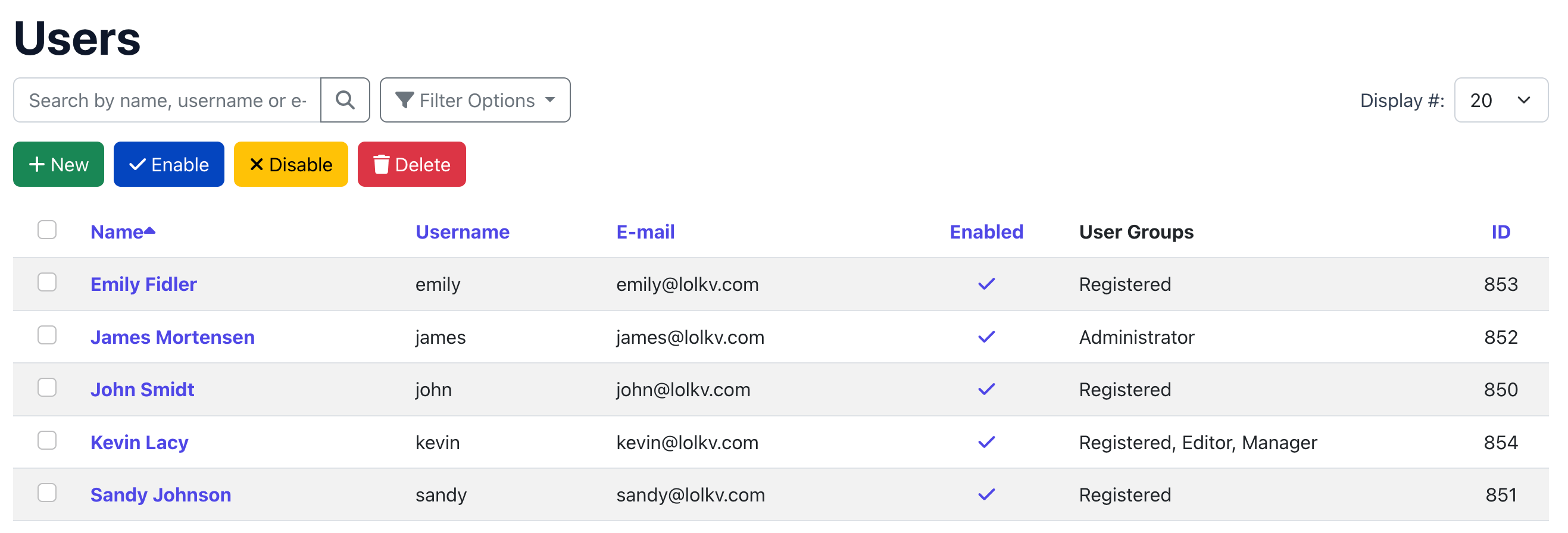
Create & Edit Users
Add new users with auto-generated passwords and welcome emails via Joomla's MailTemplate. Edit name, email, groups and custom fields. Activate, block or delete users individually or in bulk.
Manage User Groups
Create, rename and delete user groups with a clear hierarchical tree view. See at a glance which groups are admin groups. Nested indentation shows the group structure.
Manage Access Levels
Create and edit Joomla access levels with a checkbox interface. Select which user groups belong to each level. Quick "select all" and "deselect all" buttons included.
Custom Fields
Any custom fields you create for users in Joomla (com_fields) automatically appear in the create/edit form. Fields are grouped in cards per field group. Supports all Joomla field types.
Search, Sort & Filter
The user list supports real-time search, column sorting, group filtering and pagination. Find any user instantly, even with thousands of accounts.
Username = Email
Optional setting that automatically sets the username to the email address. Simplifies registration and login. The included plugin extends this to Joomla's own profile and registration forms.
Bulk import, export and migrations — included
Frontend UserManager includes the complete User Import & Export component. Handle recurring spreadsheet jobs and controlled site-to-site migrations from the same user-management workflow.
- Import and export Joomla users with CSV or XLSX files
- Map columns visually and validate every row before processing
- Create new users or update existing accounts in resumable batches
- Move user groups, supported custom fields and authorised password hashes
- Open import and export directly from the Frontend UserManager user list
Two permission modes
Pick the model that fits your use case. Switch at any time — your settings are preserved.
Hierarchical mode
Best for organizations with departments, branches or schools. Each admin can only manage users and groups within their own part of the group tree.
- 3-tier system: Frontend Superuser → Admin → No access
- Admins see their parent group and all child groups
- Based on Joomla's nested set group structure
- Administrator badge displayed in group list
Example: multi-school setup
→ School A
→ School A Teachers (admin)
→ School A Students
→ School B
→ School B Teachers (admin)
→ School B Students
School A teachers can manage School A users but cannot see School B.
Joomla standard mode
Uses Joomla's built-in com_users ACL permissions. Best when you want the same permission rules in both frontend and backend, or when you have a flat user structure.
- Based on
core.manage,core.edit,core.create,core.delete - Same permissions in frontend and backend
- All users and groups visible (no hierarchy filter)
- Configured in Joomla's Users → Options → Permissions
When to use this mode
If you already have Joomla ACL permissions configured for com_users in the backend and want the frontend to follow the same rules, this mode is for you.
Control what admins can see
Your Joomla site likely has user groups and access levels that frontend administrators should never see — like Super Users, system groups or technical access levels. Frontend UserManager lets you hide these cleanly.
- Hidden from lists — groups hidden from dropdowns and filter lists
- Hidden completely — groups invisible everywhere in the component, as if they don't exist
- Hidden access levels — specific access levels not shown in the frontend
- Super Users are always hidden automatically — they never appear in user lists
This means your frontend admins see a clean, simple view with only the groups and levels that are relevant to them.
Username & email sync plugin
When the "Username = Email" setting is enabled, you probably want this behavior everywhere in Joomla — not just in Frontend UserManager. The included plugin takes care of that.
- Hides the username field in Joomla's own profile editing
- Hides the username field on the Joomla registration form
- Automatically syncs username to email on every user save
- Enabled automatically when you install the package
- No separate configuration — reads the setting from Frontend UserManager
Everything installs together
com_userfrontendcom_usertransferplg_user_userfrontendsyncmailInstall pkg_userfrontend.zip once through Joomla's Extension Manager.
Works with — not against — Joomla
Frontend UserManager does not create its own user system. It reads and writes directly to Joomla's core tables: #__users, #__usergroups and #__viewlevels. Changes made in the frontend are immediately visible in the Joomla backend, and vice versa.
This means you can use Frontend UserManager alongside any other Joomla extension that relies on the standard user system — including EasyLearn.
Give your clients frontend user management
Get Frontend UserManager with User Import & Export, automatic updates and support included.
View Pricing